# 1. student.csv 파일을 읽고
std <- read.csv('student.csv', fileEncoding = 'cp949')
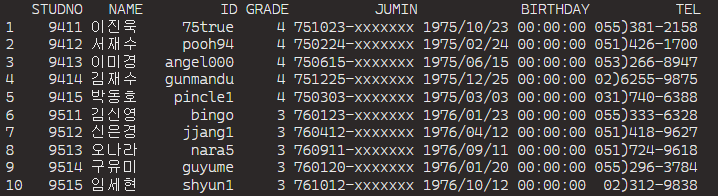
# 1) 주민번호를 아래와 같이 수정
# "7510231901810" => "751023-XXXXXXX"
[내 답안]
head(std)
class(std$JUMIN)
std$JUMIN <- str_c(str_sub(std$JUMIN,1,6), '-xxxxxxx')
std
[문제풀이]
str(std)
std$JUMIN <- str_c(str_sub(std$JUMIN,1,6), '-xxxxxxx')
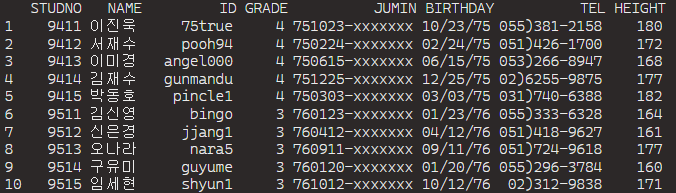
# 2) 생년월일을 아래와 같이 치환(birthday 컬럼 사용)
# 1975/10/23 => 10/23,75
[내 답안]
std$BIRTHDAY <- str_remove(std$BIRTHDAY, '00:00:00')
str_c(substr(std$BIRTHDAY, 6, 7),substr(std$BIRTHDAY, 9, 10), substr(std$BIRTHDAY, 3, 4), sep = '/')
std$BIRTHDAY <- str_c(substr(std$BIRTHDAY, 6, 7),substr(std$BIRTHDAY, 9, 10), substr(std$BIRTHDAY, 3, 4), sep = '/')
std
[문제풀이]
std$BIRTHDAY <- strptime(std$BIRTHDAY, '%Y/%m/%d %H:%M:%S')
strftime(std$BIRTHDAY, '%m/%d,%y')
std
* 참고 : 날짜변환 함수 비교
| R | SQL |
| strftime(날짜, 'format') | to_char(날짜, 'format') |
| strptime(문자, 'format') | to_date(문자, 'format') |
| as.Date(문자, 'format') |
# 2. professor.csv 파일을 읽고
pro <- read.csv('professor.csv', fileEncoding = 'cp949')
# 1) 각 교수의 직급을 교수 / 강사 여부만 출력하여 POSITION2 컬럼에 저장
[내 답안]
pro$POSITION2 <- str_replace(pro$POSITION, '\\w+교수$', '교수')
pro$POSITION2 <- str_replace(pro$POSITION2, '\\w+강사$', '강사')

[문제풀이]
pro$POSITION2 <- str_sub(pro$POSITION, -2)
pro
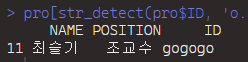
# 2) ID에서 o가 2회 이상 포함된(연속 상관없이) 교수의 이름, 직급, ID 출력
[내 답안]
pro[str_detect(pro$ID, 'o.o'), c("NAME", "POSITION", "ID")]
[문제풀이]
#sol1)
pro[str_count(pro$ID, 'o') >= 2, c('NAME', 'POSITION', 'ID')]
#sol2)
pro[str_detect(pro$ID, 'o.*o'), c('NAME', 'POSITION', 'ID')]
# 3. 2000-2013년_연령별실업율_40-49세.csv 파일을 읽고
df1 <- read.csv('2000-2013년_연령별실업율_40-49세.csv', fileEncoding = 'cp949')
names(df1) # 컬럼이름 출력
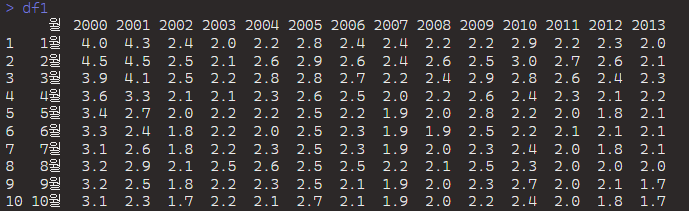
# 1) 아래와 같이 표현
# 월 2000 2001 2002
# 1월
# 2월
# ..
[내 답안]
head(df1)
class(df1$월)
df1$월 <- as.character(df1$월)
df1$월 <- str_c(df1$월, '월')
names(df1)[2:15] <- str_remove_all(names(df1)[2:15], 'X|년')
df1
[문제풀이]
# 월 컬럼 수정)
df1$월 <- str_c(df1$월, '월')
# 컬럼 이름 변경
names(df1) <- str_remove_all(names(df1), 'X|년')
names(df1[2:length(names(df1))]) <- str_remove_all(names(df1[2:length(names(df1))]), 'X|년')
names(df1)[-1] <- str_remove_all(names(df1)[-1], 'X|년')
# 2) 2005년 상반기의 실업율 평균
options(digits=9) # 숫자 출력 자리수 조절 방법
[내 답안]
round(mean(df1$'2005'[1:6]),1)

[문제풀이]
df1$'2005'
mean(df1$'2005'[1:6])
# 3) 2009년 실업율 중 2.5 미만인 경우 기존 실업율의 10% 증가값으로 수정
df1$`2009` # key 이름이 숫자일 경우는 역따옴표와 함께 key indexing 처리!!
[내 답안]
up <- df1$'2009' < 2.5
df1$`2009`[up] <- round(df1$`2009`[up] * 1.1, 1)
df1

[문제풀이]
* 두 방법 모두 가능하나 두 번째 방법 사용을 권고
df1$'2009'[df1$'2009' < 2.5] <- df1$'2009'[df1$'2009' < 2.5] * 1.1
(추천) df1[df1$'2009' < 2.5, "2009"] <- df1[df1$'2009' < 2.5, "2009"] * 1.1
df1
# 4. professor.csv 파일을 읽고
# HPAGE가 없는 교수의 홈페이지 주소를 아래와 같이 수정
# http://www.itwill.com/email_id
[내 답안]
prof <- read.csv('professor.csv', fileEncoding = 'cp949')
prof
class(prof$HPAGE)
newmail <- str_c('http://www.itwill.com/', prof$ID)
newmail
is.na(prof$HPAGE)
prof$HPAGE[prof$HPAGE == ""] <- NA
is.na(prof$HPAGE)
str_replace_na(prof$HPAGE, "NEWMAIL")
prof$HPAGE <- str_replace(str_replace_na(prof$HPAGE, "NEWMAIL"), 'NEWMAIL', newmail)
prof

[문제풀이]
# step1) email_id 추출
vno <- str_locate(pro$EMAIL, '@')[,'start'] # @ 위치
email_id <- str_sub(pro$EMAIL, 1, vno-1)
# step2) 홈페이지주소 가공
pro$HPAGE2 <- str_c('http://www.itwilll.com', email_id)
# step3) 홈페이지 주소가 없는 경우 수정
pro[pro$HPAGE == '', 'HPAGE'] <- pro[pro$HPAGE == '', 'HPAGE2']
'아이티윌_데이터 분석 55기 > 문제풀이_통계 및 분석' 카테고리의 다른 글
| #6-2. 6일차 퀴즈에 대한 문제풀이 (0) | 2026.04.07 |
|---|---|
| #5-2. 5일차 퀴즈에 대한 문제풀이 (0) | 2026.04.03 |
| #4-2. 4일차 퀴즈에 대한 문제풀이 (0) | 2026.04.02 |
| #3-2. 3일차 퀴즈에 대한 문제풀이 (0) | 2026.04.01 |
| #1-2. 1일차 퀴즈에 대한 문제풀이 (0) | 2026.03.30 |