01 실전9. selenium을 사용한 네이버 검색 (동적 크롤링)
02 실전10. selenium을 사용한 네이버 맛집 평점
03 실전 11. 다양한 맛집 정보 가져오기
04 네이버 베스트셀러 정보 가져오기
01 실전9. selenium을 사용한 네이버 검색 (동적 크롤링)
selenium : 동적 크롤링 라이브러리로 크롬드라이버를 사용하여 rul 접속 후 여러가지 액션을 전달할 수 있음
액션 : 클릭, 뒤로가기, 엔터, 검색어 입력
pip install selenium
#1. 필요 라이브러리 로딩
from selenium import webdriver
from bs4 import BeautifulSoup
from seleniuhttp://m.webdriver.common.by import By
from seleniuhttp://m.webdriver.common.keys import Keys
import time
#2. 웹브라우저 구동
url = 'http://www.naver.com'
driver = webdriver.Chrome() # 크롬 브라우저 실행
driver.get(url)
#3. action 전달
element.click() # 특정 요소 클릭
driver.back() # 뒤로가기
driver.forward() # 앞으로가기
driver.refresh() # 새로고침
driver.close() # tab 닫기
driver.quit() # 창 닫기
driver.delete_all_cookies() # 전체 쿠키 삭제
driver.maximize_window() # 창 최대화
driver.minimize_window() # 창 최소화
driver.implicitly_wait(3) # 3초 대기
driver.page_source # html source 가져오기
#4. HTML 소스 추출 / 구조분석
html = driver.page_source
soup = BeautifulSoup(html, 'html.parser')
02 실전10. selenium을 사용한 네이버 맛집 평점
# 덕천칼국수 평점 가져오기
#1. 필요 라이브러리 로딩
from selenium import webdriver
from bs4 import BeautifulSoup
from seleniuhttp://m.webdriver.common.by import By
from seleniuhttp://m.webdriver.common.keys import Keys
import time
#2. 웹브라우저 구동
url = 'http://www.naver.com'
driver = webdriver.Chrome() # 크롬 브라우저 실행
driver.get(url)
#3. 검색어 입력 / 엔터
element = driver.find_element(By.ID, 'query')
element.send_keys('덕현칼국수')
element.send_keys(Keys.ENTER)
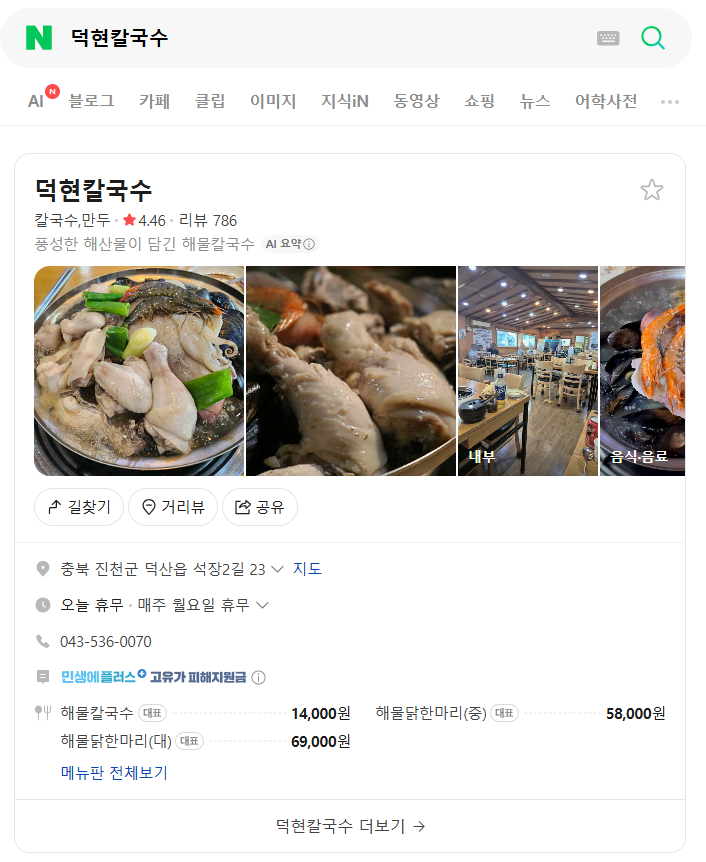
#4. HTML 소스 추출 / 구조분석
html = driver.page_source
soup = BeautifulSoup(html, 'html.parser')
soup.select('span.dtDQt.Jfp5S > span:nth-child(3)')[0].text
soup.select('span.dtDQt.Jfp5S > span:nth-child(3)')[0].text
Out[45]: '4.46'
#5. 추가 맛집 정보 확인
driver.back()
# ** 대기
driver.implicitly_wait(3) # 3초 대기 (최대 3초 대기 -> 응답이 없으면 최대 3초 대기, 응답이 있으면 바로 넘어감)
time.sleep(3) # 3초 대기 (프로그램 응답여부와 상관없이 3초 강제 대기 -> 봇 감지 피할 목적으로 주로 사용)
# ** 또 다른 검색어 입력 반복
03 실전 11. 다양한 맛집 정보 가져오기
list1 = ['덕현칼국수', '참치공방 강남점', '퀸즈가든 강남역점', '닭갈비전 강남점', '치스타리에 강남역점']
def navar_rating(driver, name): # driver를 매개변수로 받음
element = driver.find_element(By.ID, 'query')
element.send_keys(name)
element.send_keys(Keys.ENTER)
time.sleep(1) # sleep이 지정되지 않으면 너무 빠른 속도로 검색을 하기 때문에 문제가 발생할 수 있음
html = driver.page_source
soup = BeautifulSoup(html, 'html.parser')
rating = soup.select('span.dtDQt.Jfp5S > span:nth-child(3)')[0].text
return rating
def naver_place_rating(lists):
url = 'http://www.naver.com'
driver = webdriver.Chrome()
driver.get(url)
ratings = []
for name in lists: # lists를 매개변수로 받았으면 lists를 써야 함
rating = navar_rating(driver, name) # driver를 넘겨줌
ratings.append(rating)
driver.back()
time.sleep(3)
driver.quit() # 다 끝나면 창 닫기
return ratings # 결과 반환도 빠져있었음
result = naver_place_rating(list1)
print(result)
['4.46', '4.46', '4.79', '4.76', '4.85']
# =============================================================================
# 참고 : 네이버 로그인하기
# =============================================================================
from selenium import webdriver
from seleniuhttp://m.webdriver.common.by import By
from seleniuhttp://m.webdriver.common.keys import Keys
import time
driver = webdriver.Chrome()
driver.get('https://nid.naver.com/nidlogin.login')
time.sleep(1)
# 아이디 입력
driver.find_element(By.ID, 'id').send_keys('여기에 아이디 입력')
time.sleep(0.5)
# 비밀번호 입력
driver.find_element(By.ID, 'pw').send_keys('여기에 패스워드 입력')
time.sleep(0.5)
# 로그인 버튼 클릭
driver.find_element(By.ID, 'log.login').click()
time.sleep(2)
driver.get('https://nid.naver.com/nidlogin.login')
time.sleep(1)
04 네이버 베스트셀러 정보 가져오기
# 1. 라이브러리 로딩
from selenium import webdriver
from seleniuhttp://m.webdriver.common.by import By
from seleniuhttp://m.webdriver.common.keys import Keys
from bs4 import BeautifulSoup
import time
import requests
import httpx
# 2. url 가져오기
html = requests.get(url)
html.status_code # 418
html = httpx.get(url)
html.status_code # 418
# 3. 동적 크롤링
url = 'https://search.shopping.naver.com/book/search?bookTabType=BEST_SELLER&catId=50005542&pageIndex=1&pageSize=40&query=%EB%84%A4%EC%9D%B4%EB%B2%84%20%EB%8F%84%EC%84%9C&sort=REL'
driver = webdriver.Chrome()
driver.get(url)
time.sleep(1)
html = driver.page_source
# 4. 정보 가져오기
soup = BeautifulSoup(html, 'html.parser')
driver.quit()
# ** 목록마다 책이름/가격/평점 가져오기
#book_list > ul > li:nth-child(1) > div > a.bookListItem_info_top__DLxpl.linkAnchor._nlog_click._nlog_impression_element > div.bookListItem_text_area__6gSV2 > div.bookListItem_title__1mWGq > span > span:nth-child(2)
#book_list > ul > li:nth-child(1) > div > div > div:nth-child(1) > div.bookListItem_sub_inner_top__y0chJ > div > em
#book_list > ul > li:nth-child(1) > div > a.bookListItem_info_top__DLxpl.linkAnchor._nlog_click._nlog_impression_element > div.bookListItem_text_area__6gSV2 > div.bookListItem_grade__e60mi
soup.select('li.bookListItem_item_book__RbpgP')[0].select('div.bookListItem_title__1mWGq > span > span:nth-child(2)')
soup.select('li.bookListItem_item_book__RbpgP')[0].select('div:nth-child(1) > div.bookListItem_sub_inner_top__y0chJ > div > em')
soup.select('li.bookListItem_item_book__RbpgP')[0].select('div.bookListItem_text_area__6gSV2 > div.bookListItem_grade__e60mi')[0].text[2:6].replace('\xa0', '')
main_list = soup.select('li.bookListItem_item_book__RbpgP')
list_names = []; list_price=[]; list_ratings=[]
for lists in main_list :
# 책이름
names = lists.select('div.bookListItem_title__1mWGq > span > span:nth-child(2)')
if len(names) == 0 :
list_names.append(None)
else :
list_names.append(names[0].text)
# 가격
price = lists.select('div:nth-child(1) > div.bookListItem_sub_inner_top__y0chJ > div > em')
if len(price) == 0 :
list_price.append(None)
else :
list_price.append(price[0].text)
# 평점
rating = lists.select('div.bookListItem_text_area__6gSV2 > div.bookListItem_grade__e60mi')
if len(rating) == 0 :
list_ratings.append(None)
else :
list_ratings.append(rating[0].text[2:6].replace('\xa0', ''))
# 데이터프레임 생성
import pandas as pd
df = pd.DataFrame({'title':list_names, 'price':list_price, 'rating':list_ratings})
df
Out[51]:
                                          title   price rating
0                                          싯다르타   7,200   4.91
1   2026 큰별쌤 최태성의 별별한국사 한국사능력검정시험 심화(1,2,3급)(상)  16,650   4.87
2                               코스모스(100만부 기념판)  19,800    5.0
3   2026 큰별쌤 최태성의 별별한국사 한국사능력검정시험 심화(1,2,3급)(하)  16,650   4.92
4                                 니체와 함께 지적 대화를  16,920   4.78
..                                          ...     ...    ...
93                            원피스 ONE PIECE 114   5,850   4.91
94                                   쇼펜하우어 인생수업  15,750   4.78
95                              라오어의 미국주식 무한매수법  14,400   4.86
96           2027 해커스공무원 영어 올인원 기본서 (9급 공무원) 세트  49,500    4.8
97                           지적인 삶을 위한  열 가지 철학  17,820   None

[98 rows x 3 columns]
len(df)
len(df)
Out[52]: 98
'아이티윌_데이터 분석 55기 > 강의내용 필기_분석(Python)' 카테고리의 다른 글
| #14 14일차_웹크롤링 실습 (0) | 2026.07.09 |
|---|---|
| #13 13일차_웹크롤링 (0) | 2026.07.08 |
| #12 12일차_군집분석, 연관분석 (0) | 2026.06.19 |
| #10 회귀모형과 패널티 모형, 부스팅 이론 (0) | 2026.06.18 |
| #8 클래스 불균등 처리 (0) | 2026.06.15 |